Free Outlook Tricks : How to import email address to other format

Did you have any difficulties on copying email address from 1 computer to another? or probably would like to copy all the autocomplete email address in outlook to another computer. Here is a simple free software that will do all the magic for you. With a simple step, you will be able to extract all the email address in your outlook and export it in any file you want.

Basic Understanding

Each time that you send a new message in Outlook, the emails that you type in To/Cc fields, are automatically inserted into the AutoComplete list, so in the next time that you type an email address, Outlook automatically completes the right email address for you.
The AutoComplete file of Outlook is stored under [Your Profile]\Application Data\Microsoft\Outlook , and it always saved as the profile name of Outlook with .NK2 extension. - source
Step
1. Download Free Software here.
2. Extract the nk2view.zip file using WinRar of WinZip.
3. Click on the nk2view application.
4. Select  File >> Open .NK2 file
5. Locate your personal .NK2 file as per [Your Profile]\Application Data\Microsoft\Outlook
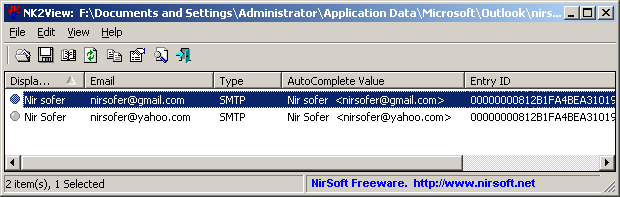
6. After open the .nk2 file, you will be able to see all the email,name & autocomplete value.


7. To save the list, select file >> Save selected item.
8. There are a few type of file you will be able to save to. ( e.g .csv, .txt. or .html )
9. Done and enjoy your contact email list.

credit to NirSoft for providing this useful software.

Free Blog Tricks : Classic Social Bookmark


To install the 'Social Bookmark ' like the screenshot above, please follow these simple steps at the bottom.
1. Sign in your blogger account.
2. Select LAYOUT -> EDIT HTML.
3. BACKUP TEMPLATE you first to avoid any problems.
4. Click the Expand Widget Templates such as the screenshot below.


5. Find this code.
]]></b:skin>
6. Copy code below and put it above the code earlier.
.rsociales ul {
display:inline;
margin:0pt !important;
padding:0pt !important; }

.rsociales li {
background:transparent none repeat scroll 0%;
display:inline;
list-style-type:none;
margin:0pt;
padding:2px; }

.rsociales img {
border:0pt none;
float:none;
margin:0pt;
padding:0pt; }

.rsociales-sobre { opacity:0.4; }
.rsociales-sobre:hover { opacity:1; }
7. Now find this code.
<div class='post-footer-line post-footer-line-3'/>

8. Copy the code below and put it below the code above.
<div class='rsociales'>

<ul>

<li><a expr:href='&quot;http://www.technorati.com/faves?add=&quot; + data:post.url + &quot;&amp;title=&quot; + data:post.title' target='_blank'><img alt='Agregar a Technorati' class='rsociales-sobre' src='https://blogger.googleusercontent.com/img/b/R29vZ2xl/AVvXsEhY06fWkt_Obiei08C5Vk9x4wZzPcyAgBl_0GN2CI2nWR9uYKsqUgdb0dz8QwNNvKrVIpFEDG09Bas-yuCNsw-r239Ck9z8X7xApWxN_O7qU3cMcklEn9J3FSW43lB3QUliMDLU95gQjUY/s1600/technorati.gif'/></a></li>

<li><a expr:href='&quot;http://del.icio.us/post?url=&quot; + data:post.url + &quot;&amp;title=&quot; + data:post.title' target='_blank'><img alt='Agregar a Del.icio.us' class='rsociales-sobre' src='https://blogger.googleusercontent.com/img/b/R29vZ2xl/AVvXsEgt0Xw_kwSyU2tmApsEHCJfeMFwcv9Li6j42t-G207MiH9tzSPoY4nWUcLj8wcj0-qY0zLP_U5nXeWN2ljb02lO9aNdk3IOk5TzpovGcH_-M4PjfgEnfXhaJ393MXCXzen5GtodGZi3qQ8/s1600/delicious.gif'/></a></li>

<li><a expr:href='&quot;http://digg.com/submit?phase=2&amp;amp;url=&quot; + data:post.url + &quot;&amp;title=&quot; + data:post.title' target='_blank'><img alt='Agregar a DiggIt!' class='rsociales-sobre' src='https://blogger.googleusercontent.com/img/b/R29vZ2xl/AVvXsEifg6z0WjiUvErnuZCvnMyXHPetM5zX2iAeAKju0Ia4-ASxXVfawDvF_sW9HA5oSALu2j4numr90fcFH65s0M6TLEZy8s1X4bLMCN3rXDEvBVhGApjvboE-q6ttZE-gAEdzjpEhCXfW8iA/s1600/digg.png'/></a></li>

<li><a expr:href='&quot;http://myweb2.search.yahoo.com/myresults/bookmarklet?u=&quot; + data:post.url + &quot;&amp;title=&quot; + data:post.title' target='_blank'><img alt='Agregar a Yahoo!' class='rsociales-sobre' src='https://blogger.googleusercontent.com/img/b/R29vZ2xl/AVvXsEge6ZSnWbwS1eLKA5H0eylRIzCSGtWa2sNco_ubd8rcE18aS-MCpbOKvoZJnjUvfxFkyHn5wtc-vsD4qVbQuRRgF-zoMbMH20aH6dJSA05Fzu33VT1kDTN1ZqsrjLXukCQ_hBAA4GVGMo4/s1600/yahoo.png'/></a></li>

<li><a expr:href='&quot;http://www.google.com/bookmarks/mark?op=edit&amp;output=popup&amp;bkmk=&quot; + data:post.url + &quot;&amp;title=&quot; + data:post.title' target='_blank'><img alt='Agregar a Google' class='rsociales-sobre' src='https://blogger.googleusercontent.com/img/b/R29vZ2xl/AVvXsEgtlyM-34eov0g12AnumvS25c24op08V34KVVP73H4N1D4hqxC1yG2zlX8T3Li2ntWV1Ue8QthH5zE0jLc3Igi5-qMuNsCiBfTbObAtuC3lcIsDLSjRZj2U909WDtZn5eAabKXGJMDffpE/s1600/google.gif'/></a></li>

<li><a expr:href='&quot;http://meneame.net/submit.php?url=&quot; + data:post.url + &quot;&amp;title=&quot; + data:post.title' target='_blank'><img alt='Agregar a Meneame' class='rsociales-sobre' src='https://blogger.googleusercontent.com/img/b/R29vZ2xl/AVvXsEhSnu7-Hla80atgZyKOpCjgfq7QTIlmeMAzv-qrArCSXDJOLVaPHRAIHTgMWhy1BFMvt4ibvFOTGumKer74FH3bnFTpIpcC1nbbtI25c8f8wC0xK6hRFVNW9iVv-nxnX3JjbfyeL-cFqAs/s1600/meneame.png'/></a></li>

<li><a expr:href='&quot;http://www.furl.net/storeIt.jsp?u=&quot; + data:post.url + &quot;&amp;title=&quot; + data:post.title' target='_blank'><img alt='Agregar a Furl' class='rsociales-sobre' src='https://blogger.googleusercontent.com/img/b/R29vZ2xl/AVvXsEjfxVKBxPFY3eyJhdDRpW801b-KsKG_uimKmaj9e5cj77lPSPtUiMg1okxwFLDCv5Cw03uvNQcvku9NWKvFKJLNGlwfUG9LWFplcxak26B5A3rdCXoCWy37W4BgnvT33aGqqOTgWrJ8BMo/s1600/furl.png'/></a></li>

<li><a expr:href='&quot;http://reddit.com/submit?url=&quot; + data:post.url + &quot;&amp;title=&quot; + data:post.title' target='_blank'><img alt='Agregar a Reddit' class='rsociales-sobre' src='https://blogger.googleusercontent.com/img/b/R29vZ2xl/AVvXsEgTybE9ZlOi5ju_pebi4IpgNT737KG2Wuoi-jpj8BLnmGYn4HRhkXTzOPwhfmptYZ4LDOdmHTvIS7JZfWCZZA7E6wrzqIMljRGhHB9L5-9ocfk-axqZjsMUUw-CxL1WheSthoQZc9oqekY/s1600/reddit.gif '/></a></li>

<li><a expr:href='&quot;http://ma.gnolia.com/beta/bookmarklet/add?url=&quot; + data:post.url + &quot;&amp;title=&quot; + data:post.title' target='_blank'><img alt='Agregar a Magnolia' class='rsociales-sobre' src='https://blogger.googleusercontent.com/img/b/R29vZ2xl/AVvXsEjyV6gQ2nX8F76GQLch0JLDzpE50kdlcSUFHN8qbvcgcucuftuhzgGTSknds-7S25Or-ti6gPJjVMpMydV3oRqdvEjRdjf6NZqXYnokBlp_QMJTOGmlQOzYCFuUvjdmtXiCuFF4Im89Uaw/s1600/magnolia.gif'/></a></li>

<li><a expr:href='&quot;http://www.blinklist.com/index.php?Action=Blink/addblink.php&amp;Description=&amp;Url=&quot; + data:post.url + &quot;&amp;title=&quot; + data:post.title' target='_blank'><img alt='Agregar a Blinklist' class='rsociales-sobre' src='https://blogger.googleusercontent.com/img/b/R29vZ2xl/AVvXsEiIZigDmH6vBRZCpm7k6mfD_CAx6MX-Tn4d2ajidM66TSe-5uVK4oQK7eLyigOBxSux62-OS24xoWDI3RnqaL-9jFviUscKK9NtdvdaE4MwYdJaqX-w9gRIIRx-YmJ2da-gcZ5hqCbdgns/s1600/blinklists.gif'/></a></li>

<li><a expr:href='&quot;http://blogmarks.net/my/new.php?mini=1&amp;simple=1&amp;url=&quot; + data:post.url + &quot;&amp;title=&quot; + data:post.title' target='_blank'><img alt='Agregar a Blogmarks' class='rsociales-sobre' src='https://blogger.googleusercontent.com/img/b/R29vZ2xl/AVvXsEif3JJaI8lE2sZQX_bi-GK3xw3ouk9ceUkYQSBsREHg49h-Oiq70WKZEMmsZtgHgkzqFiRjVJcH9sUmigtuWliEDJUpm6H8QQeEG2HnCBZPMMACohkx5DpivPuXEC9_RBgSTpFT6NzwsQo/s1600/blogmarks.gif'/></a></li>

<li><a expr:href='&quot;http://www.facebook.com/sharer.php?u=&quot; + data:post.url + &quot;&amp;title=&quot; + data:post.title' target='_blank'><img alt='Agregar a facebook' class='rsociales-sobre' src='http://lh5.ggpht.com/jaloee/SJNIyWWQmEI/AAAAAAAACRY/4GVE3Qxqg34/facebook.gif'/></a></li>

<li><a expr:href='&quot;http://twitter.com/home?status=&quot; + data:post.url + &quot;&amp;title=&quot; + data:post.title' target='_blank'><img alt='Agregar a twitter' class='rsociales-sobre' src='http://lh6.ggpht.com/jaloee/SJNIyl7oKlI/AAAAAAAACRc/8cc7q_upZI4/twitter.gif'/> </a></li>


<li><a expr:href='&quot;http://negaraku.net/fav.php?url=&quot; + data:post.url + &quot;&amp;title=&quot; + data:post.title' target='_blank'><img alt='Agregar a Negaraku!' class='rsociales-sobre' src='http://h1.ripway.com/syamzone/negaraku.png'/></a></li>

</ul>

</div>
9. Select the PREVIEW to see the results.
10. If you are satisfied SAVE TEMPLATE.

Private Post

My first tricks tips for you all.

I believe most of us using blogger for our blog rite.Have you all wonders how to keep a post(s) private or allow only certain reader to read them. Well,you will find this post useful and the best things it is free and easy to apply.


Below are the instruction for the tricks.
2. In the 'Key' field, mention the Password that you choose. This is the password which that will enable your selected reader to read your post(s).
3. In the Plain Text Field, enter the contents/information of the post which you are going to protect.
4. Click on Encrypt
5. Copy the HTML code mentioned in the Blue box
6. Now go to your blog, open a new post->Give your Title of the post-> Change the mode from 'Compose' to 'Edit Html' Mode and paste the HTML link that you just copied
7. Save and publish post.
8. FINAL STEP: Go to Layout->Edit HTML
9. Between
head
and
/head
paste the following code :
<script type="text/javascript" src="http://www.vincentcheung.ca/jsencryption/jsencryption.js"></script>
10. Now whenever the reader clicks on the password protected post, it displays the box asking them to enter the password.
Hence,only the readers having the password for your protected posts will be able to read your Private Posts!

Advertise Here

Get your Product Notice.Advertise here!!

Related Links

Labels

Recent Comments

Followers

Contributors


I changed my font at thecutestblogontheblock

Total Pageviews